GCP Secret Manager
You can use Phase to sync secrets to Google Cloud Secret Manager. Phase supports two sync modes:
- One secret per key: Each Phase secret becomes its own Secret Manager secret, named after its key. This is how Cloud Run, Cloud Run functions, GKE and the Google Cloud client libraries read secrets.
- Single JSON secret: All Phase secrets are synced as one JSON object to a single Secret Manager secret, like the AWS Secrets Manager integration.
Phase authenticates with Workload Identity Federation. No service account key is created, and Phase Cloud and self-hosted instances are set up the same way, with nothing to configure on the instance.
Prerequisites
- A Google Cloud project with billing enabled
- The
gcloudCLI, or Cloud Shell - Permission to enable APIs, create Workload Identity pools and grant IAM roles in the project, for example the Owner role, or IAM Workload Identity Pool Admin, Project IAM Admin and Service Usage Admin
When secret syncing is enabled, secrets stored inside Phase are treated as the source of truth. Secrets in Google Cloud with the same names are overwritten and managed by Phase from then on, secrets that Phase manages are disabled when their keys are removed from Phase, and versions older than the previous one are destroyed. Import your existing secrets into Phase before continuing. See Import existing secrets from GCP Secret Manager.
Set up Google Cloud credentials in Phase
Step 1: Start a new credential
- Go to Integrations from the sidebar and click on Third-party credentials.
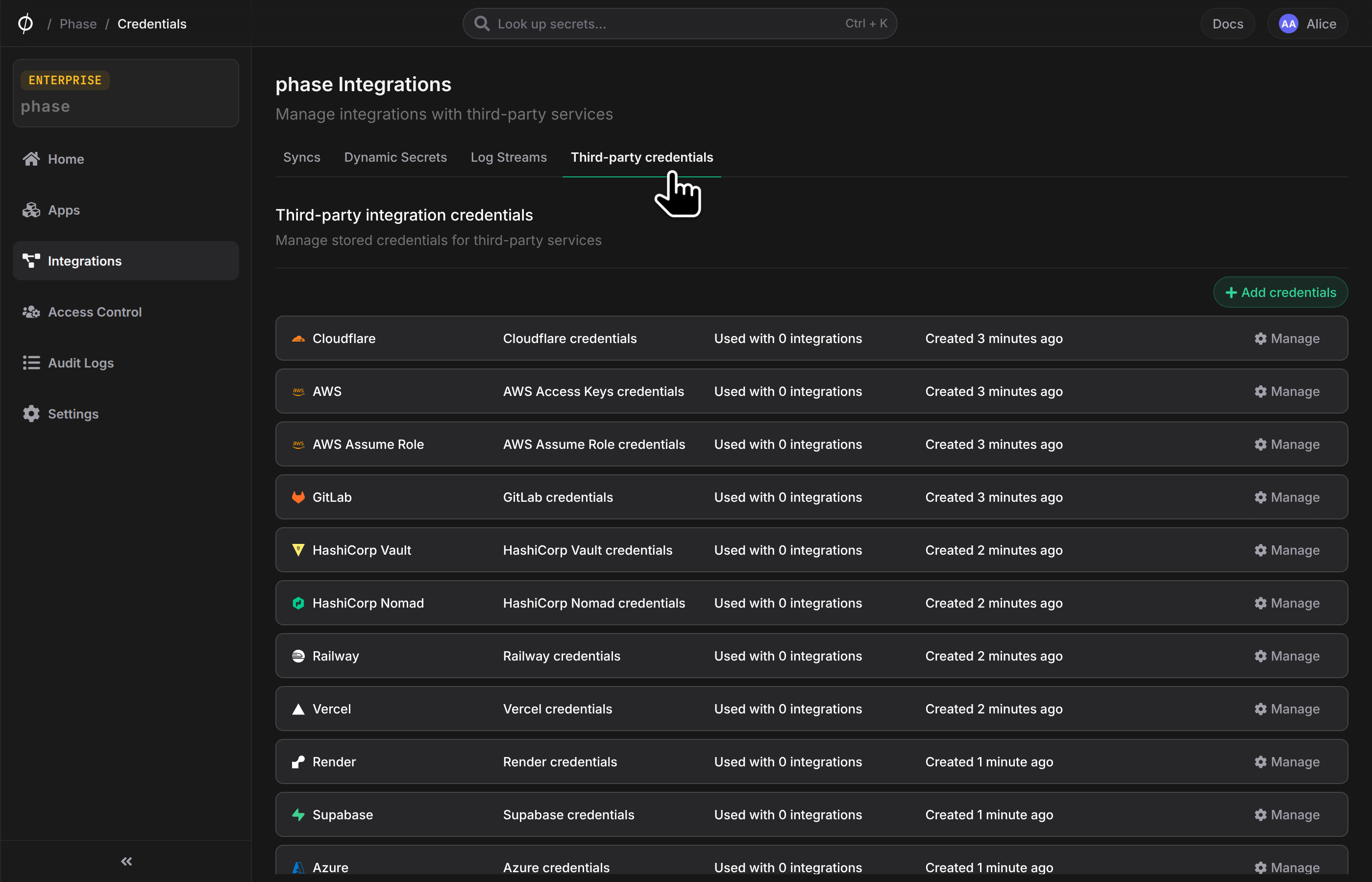
- Click on Google Cloud. Phase generates a signing key for the new credential.
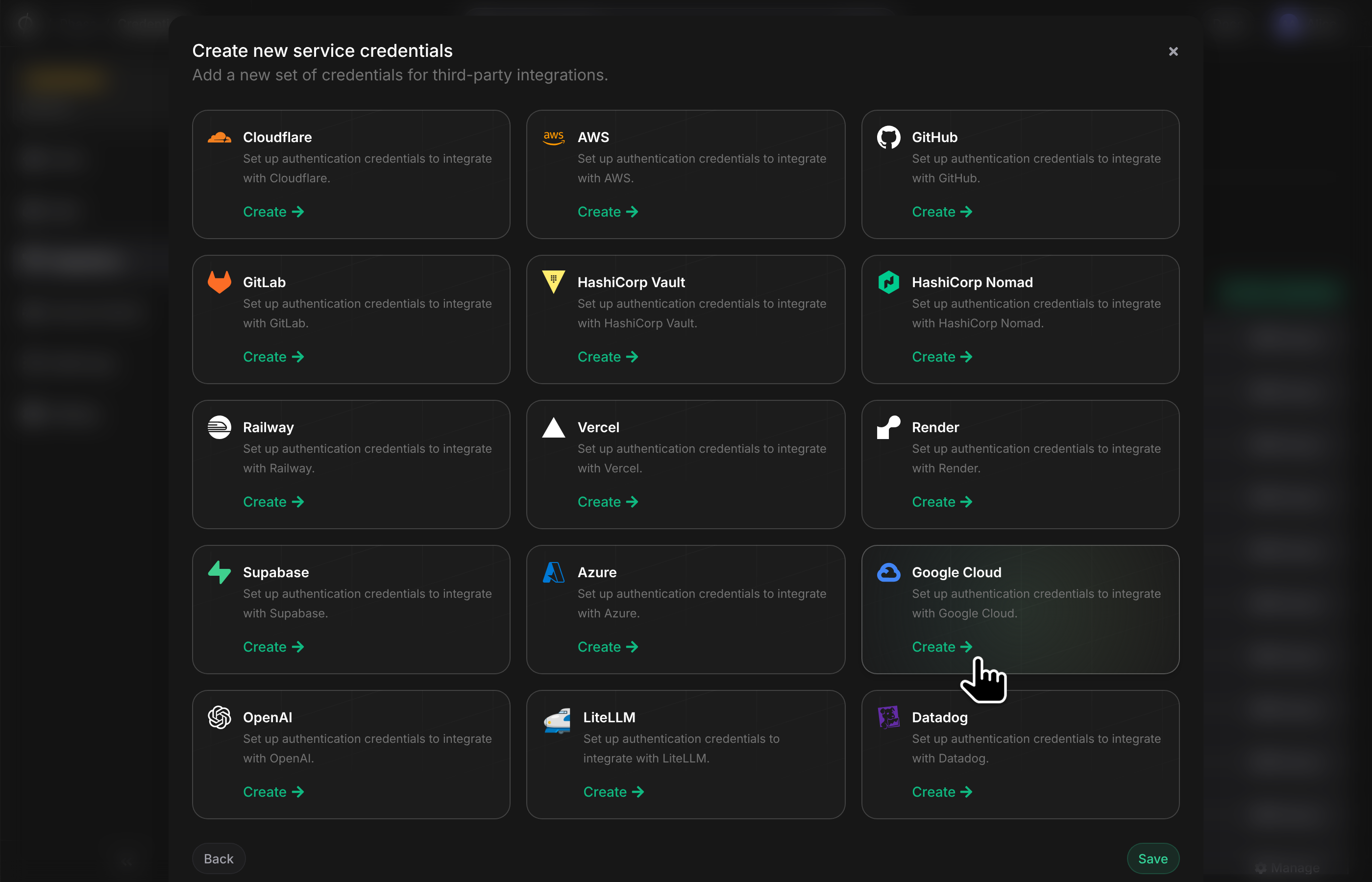
Step 2: Add the Phase public key to your Workload Identity Pool
Pick one of the four ways below. They all create the same resources.
-
Enter the project number of the Google Cloud project that will hold the Workload Identity pool. Use List your projects in the Google Cloud console to find it: open the project and its dashboard shows the project ID and number. Google identifies Workload Identity providers by project number, not ID, and Phase picks the pool and provider IDs, so the number is all Phase needs to complete the setup.
-
Phase generates a setup script for the project, in a tab per Phase integration. Pick the GCP Secret Manager tab and click Copy.
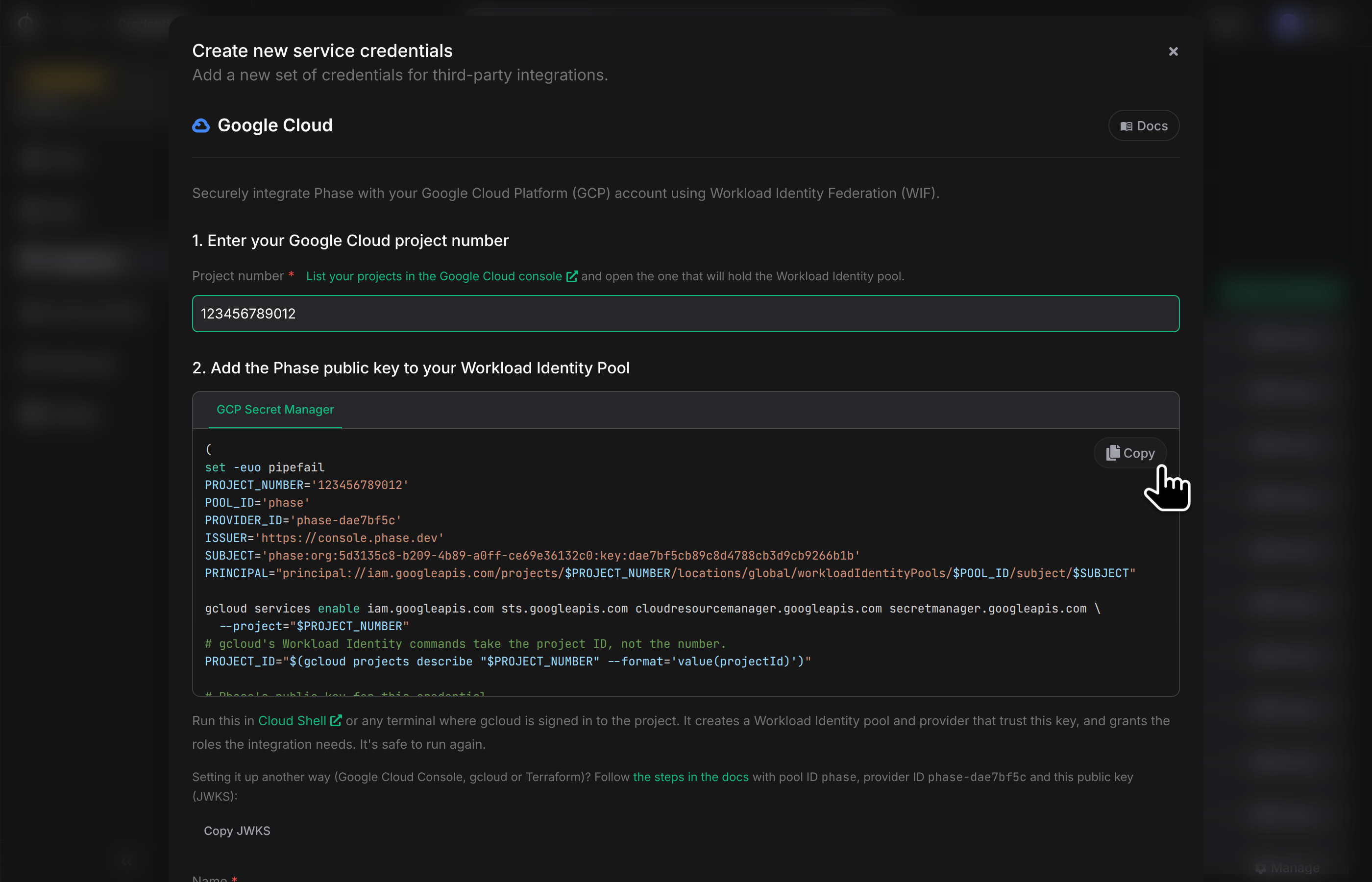
- Run the script in Cloud Shell, or in any terminal where
gcloudis signed in to the project.
The script:
- Enables the IAM, Security Token Service, Resource Manager and Secret Manager APIs.
- Creates a Workload Identity pool named
phase, if the project doesn't have one yet. Every Phase credential in the project can share it. - Creates an OIDC provider for this credential that trusts only its public key, and only tokens for its subject.
- Grants that subject the two Secret Manager roles described in Permissions.
It's safe to run again: it restores a pool or provider deleted in the last 30 days, and brings an existing provider back in line with the credential. It runs in a subshell that stops at the first error, so a failure never closes your Cloud Shell session.
Step 3: Verify and save
Give the credential a descriptive name and click Verify and save. There's nothing to copy back from Google Cloud: Phase already knows the provider's name.
Google doesn't check an uploaded JWKS when the provider is created, so Phase verifies the setup by exchanging a real token with Google before saving. If verification fails, the error from Google is shown; see Troubleshooting.
If someone else will run the script, for example a Google Cloud admin, copy it first, then click Save anyway once verification fails. The script isn't shown again after you save. IAM changes can also take a few minutes to apply, so if you just ran the script, wait a moment and click Verify and save again.
The credential's page in Phase shows its workload identity provider and the public key (JWKS) Phase signs with, so you can match it to the provider in Google Cloud.
Permissions
The setup grants two predefined roles:
| Role | Why Phase needs it |
|---|---|
roles/secretmanager.editor | Create secrets, add versions, update labels and encryption settings, and disable or destroy versions. It can't change IAM policies. |
roles/secretmanager.secretAccessor | Read a secret's current value, so Phase only adds a version when the value actually changed. |
Phase never deletes secrets. For a narrower grant, create a custom role with exactly the permissions Phase uses and grant it instead of the two roles above:
gcloud iam roles create phaseSecretSync --project="$PROJECT_ID" --title="Phase secret sync" \
  --permissions=secretmanager.secrets.list,secretmanager.secrets.get,secretmanager.secrets.create,secretmanager.secrets.update,secretmanager.versions.add,secretmanager.versions.access,secretmanager.versions.list,secretmanager.versions.disable,secretmanager.versions.destroy
Other projects
A credential's setup covers the project that holds its Workload Identity pool. To sync to another project, create another Google Cloud credential for that project.
Sync Secrets from Phase
Step 1: Choose a destination
-
Enable Server-side Encryption (SSE) for the App from the Settings tab if not enabled already.
-
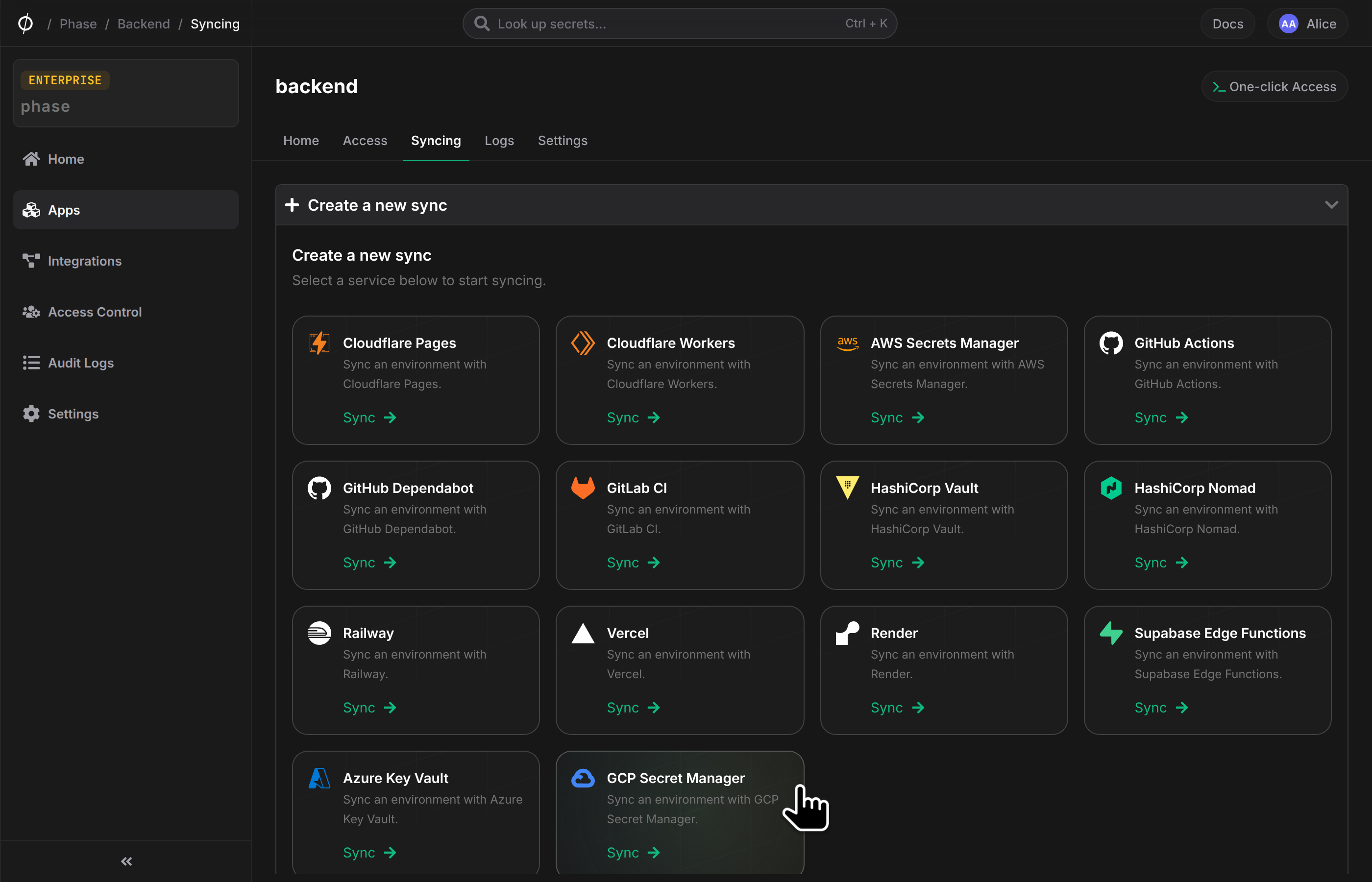
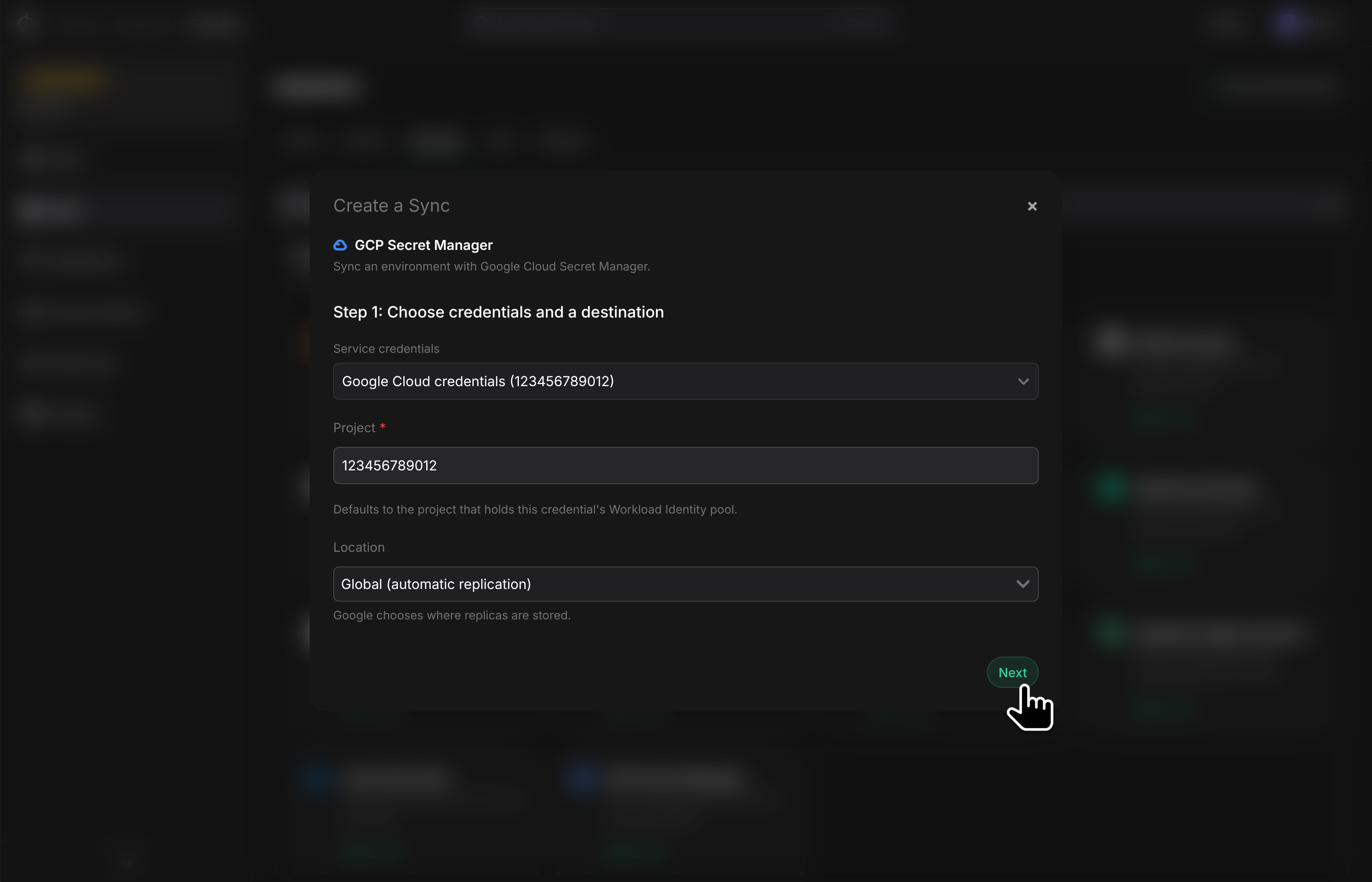
Go to your App in the Phase Console and open the Syncing tab. Select GCP Secret Manager under the 'Create a new Sync' menu.
-
Select your Google Cloud credential. The Project defaults to the project that holds the credential's Workload Identity pool, where the setup script granted access.
-
Choose a Location:
- Global (automatic replication): Google chooses where replicas are stored.
- A region or multi-region (e.g.
europe-west4,us,eu): a regional secret, stored and served only in that location through its regional endpoint. Use this for data residency.
-
Click Next. Phase lists the project's secrets to check that it has access.
If Phase can't access the project, the error from Google is shown. IAM changes can take a few minutes to take effect.
Step 2: Configure the sync
-
Choose the Phase Environment and Path as the source for secrets.
-
Choose how secrets are mapped:
Each Phase secret becomes a Secret Manager secret with the same name, plus an optional prefix, so several environments can share a project:
| Phase key | Prefix | Secret Manager secret |
|---|---|---|
DATABASE_URL | none | DATABASE_URL |
DATABASE_URL | PROD_ | PROD_DATABASE_URL |
stripe-key | staging- | staging-stripe-key |
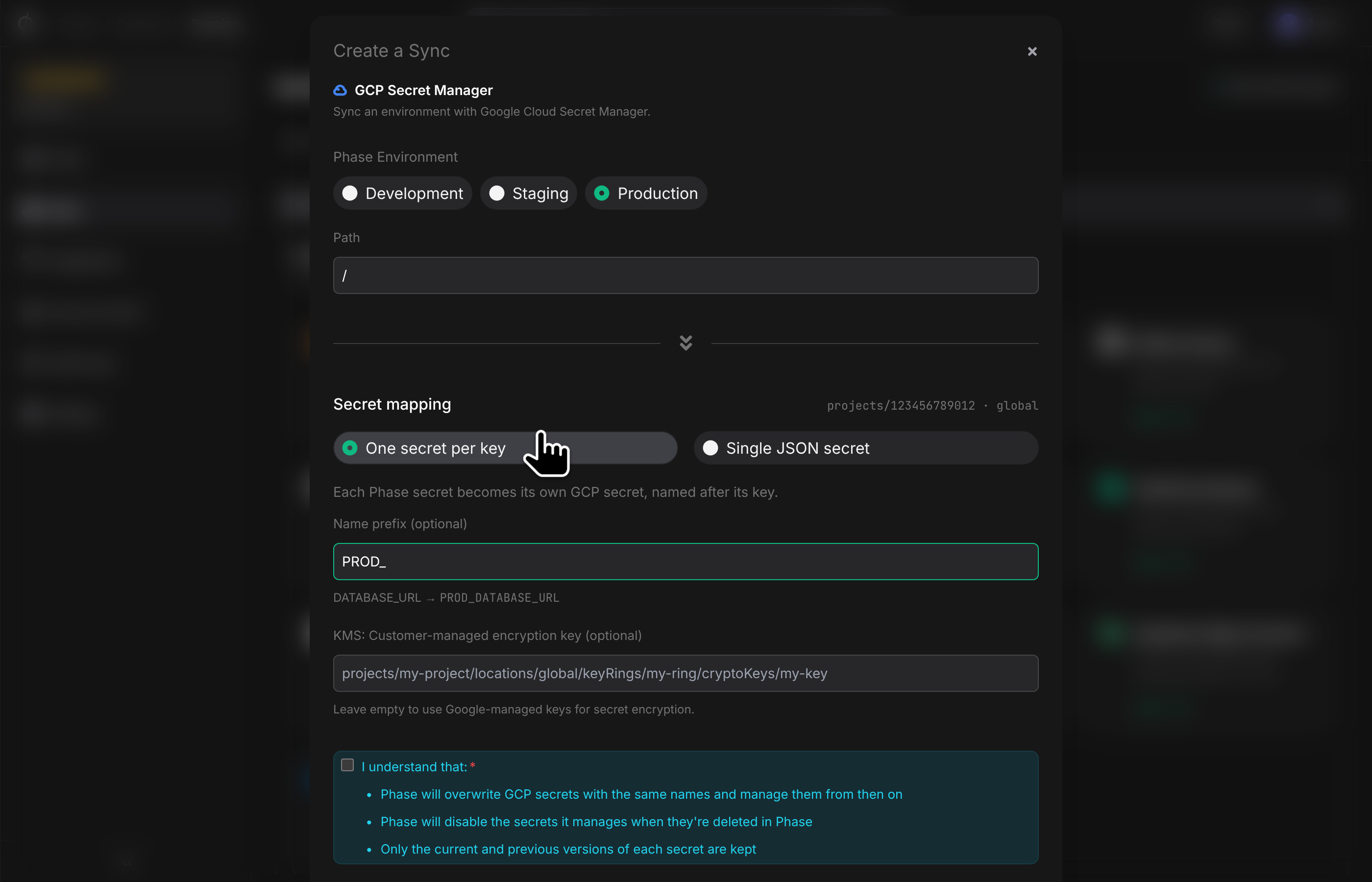
Secret names may only contain letters, numbers, hyphens (-) and underscores (_), up to 255 characters including the prefix. Phase doesn't rename keys: if any key doesn't fit, for example spring.datasource.url, the sync fails before writing anything and lists the keys to rename.
Reference the synced secrets by name, using the latest version so updates from Phase are picked up. For example, on Cloud Run:
gcloud run deploy my-service --image=IMAGE \
  --set-secrets=DATABASE_URL=DATABASE_URL:latest
-
Optionally, enter a Customer-managed encryption key. Phase then shows a script that gives your project's Secret Manager service agent access to the key. Run it before you create the sync. See Encrypt secrets with a customer-managed key.
-
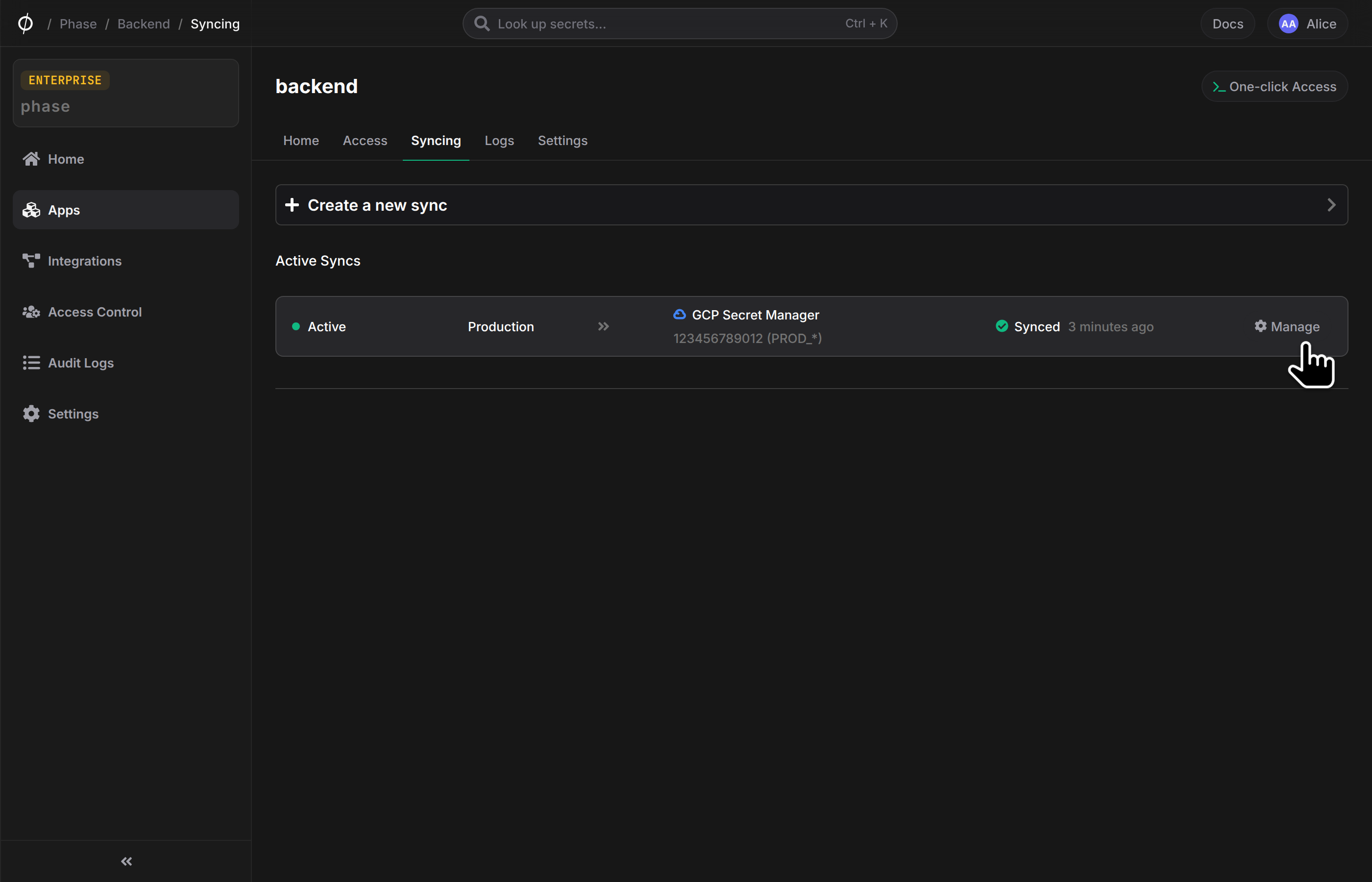
Confirm that you understand how Phase will overwrite, disable and prune secrets, then click Create. The sync starts right away, and runs again whenever secrets change in Phase.
Limits & Behavior
- Ownership: Phase labels every secret it manages with
managed_by=phase,phase_sync=SYNC_IDandphase_org=ORG_ID. It only ever disables secrets that carry its own sync's label, so a secret created outside Phase is only disabled once the sync has taken it over. - Existing secrets: A secret with the same name that was created outside Phase is taken over: Phase adds its labels (keeping yours) and a new version, and manages it from then on, like a secret it created. A secret labelled by a different Phase sync is left untouched and reported in the sync log, unless that sync was deleted and belonged to the same organisation: a sync's options can't be edited, so a sync you delete and recreate takes over the secrets its predecessor wrote. Secrets that another organisation, or another Phase instance, syncs to the same project are never taken over.
- Changes: Phase compares each value with the secret's current version and only adds a version when the value changed.
- Versions: Phase keeps the current and the previous version of each secret, like AWS Secrets Manager's
AWSCURRENTandAWSPREVIOUS, and destroys older versions, because Google bills every version that isn't destroyed. If a secret has delayed destruction configured, Google honours it. Referencelatestrather than pinning version numbers. - Removed keys: When a key is removed from Phase, Phase disables every version of the secret it manages for that key and labels it
phase_removed=true, so later syncs skip it without reading its versions. Readinglatestthen fails, so stale values aren't served, while the secret and its IAM bindings stay in place. If the key is added back, Phase adds a new, enabled version and clears the label. Phase disables a removed key's versions once: if someone re-enables a version or adds one in Google Cloud afterwards, Phase leaves it alone. Delete the secret in Google Cloud once you no longer need it. - Deleting a sync in Phase leaves the secrets in Google Cloud as they are.
| Limit | Value | What Phase does |
|---|---|---|
| Secret name | Letters, numbers, - and _, up to 255 characters | Checks every name, including the prefix, before syncing |
| Secret value | 64 KiB per version | Checks every value (or the whole JSON) before syncing |
| Empty values | Not allowed | Treats the key as removed and lists it in the sync log |
Advanced: Encrypt secrets with customer-managed encryption keys (CMEK)
Secret Manager encrypts secrets with Google-managed keys by default. To use your own Cloud KMS key, enter its full name when creating the sync, e.g. projects/my-kms-project/locations/global/keyRings/my-ring/cryptoKeys/my-key.
- For global secrets, the key must be in the
globallocation. - For regional secrets, the key must be in the same location as the secret, e.g. a key in
europe-west4for secrets ineurope-west4.
Unlike AWS, Phase's credential doesn't need any Cloud KMS permissions. Secret Manager encrypts and decrypts with the key through the project's Secret Manager service agent, so that agent needs the Cloud KMS CryptoKey Encrypter/Decrypter role on the key. When you enter a key, Phase shows a script that grants it. To run the commands yourself:
# Creates the service agent if it doesn't exist yet.
gcloud beta services identity create --service=secretmanager.googleapis.com --project="$PROJECT_ID"

gcloud kms keys add-iam-policy-binding projects/my-kms-project/locations/global/keyRings/my-ring/cryptoKeys/my-key \
  --member="serviceAccount:service-$PROJECT_NUMBER@gcp-sa-secretmanager.iam.gserviceaccount.com" \
  --role=roles/cloudkms.cryptoKeyEncrypterDecrypter --condition=None
If the service agent can't use the key, the sync stops at the first secret, and the sync log shows these commands filled in for your project and key.
New secrets are created with the key. Existing secrets that the sync manages are switched to it, and because Google only applies a key to versions added after it's set, Phase adds a new version so their current value is encrypted with the key. Secrets that use user-managed replication are left unchanged and reported in the sync log: each replica needs a key in its own region, so the sync's key can't apply. To use the key, delete such a secret in Google Cloud and let Phase recreate it; its IAM bindings are deleted with it.
If your organization enforces constraints/gcp.restrictNonCmekServices for Secret Manager, set a key on the sync, or Google will reject the secrets Phase creates.
Optional: Import existing secrets from GCP Secret Manager into Phase
If you have existing secrets you want to manage with Phase, export them to a .env file and import them.
- Export the latest version of each secret. Values that span several lines need to be quoted in the file by hand:
for name in $(gcloud secrets list --project=my-project --format='value(name)'); do
  echo "$name=$(gcloud secrets versions access latest --secret=$name --project=my-project)" >> .env
done
- Import secrets into Phase via the
phase-cli:
phase secrets import .env --env development
- Delete the
.envfile:
rm .env
Troubleshooting
"Google Cloud rejected Phase's Workload Identity token"
Phase shows Google's reason after the colon:
| Google's reason | Fix |
|---|---|
Invalid JWT signature or an unknown kid | The provider doesn't have this credential's public key. Update it with the JWKS from the credential's page in Phase (see below). |
The issuer in ID Token ... does not match the expected ISSUER | The provider's issuer URI doesn't match this Phase instance. Create a new credential and run its setup script. |
The target service indicated by the "audience" parameters is invalid or The audience in ID Token ... does not match the expected audience | The provider Phase expects doesn't exist yet or has a different name: check the project number, and that the pool ID is phase and the provider ID matches the one Phase showed. You can correct the provider name on the credential's page. |
The given credential is rejected by the attribute condition | The provider was set up for a different credential. Create a new credential and run its setup script. |
| Workload identity pool or provider disabled or deleted | Re-enable it, or run the credential's setup script again if you kept a copy: it restores anything deleted in the last 30 days. Otherwise create a new credential. |
To inspect the provider, or replace its key with the one in phase-jwks.json:
gcloud iam workload-identity-pools providers describe PROVIDER_ID \
  --workload-identity-pool=phase --location=global --project=my-project

gcloud iam workload-identity-pools providers update-oidc PROVIDER_ID \
  --workload-identity-pool=phase --location=global --project=my-project \
  --jwk-json-path=phase-jwks.json
Permission denied
The credential's principal needs roles/secretmanager.editor and roles/secretmanager.secretAccessor on the project you're syncing to; the setup script grants both in the credential's project. If you're syncing to a different project, create a credential for that project instead. IAM changes can take a few minutes to take effect.
To check the current grants:
gcloud projects get-iam-policy my-project \
  --flatten="bindings[].members" \
  --filter="bindings.members:principal://iam.googleapis.com/" \
  --format="table(bindings.role, bindings.members)"
The Secret Manager API is disabled
The sync log includes a link to enable the API for the project. Or run:
gcloud services enable secretmanager.googleapis.com --project=my-project
Blocked by an organization policy
Errors that mention a constraint, such as constraints/gcp.resourceLocations (allowed locations), constraints/gcp.restrictNonCmekServices (CMEK required) or VPC Service Controls, come from your organization's policies. Choose a permitted location, set an encryption key on the sync, or ask your Google Cloud admin to allow the request.