Kubernetes
You can use Phase to sync secrets with applications running in your Kubernetes cluster.
Prerequisites
- Sign up for the Phase Console and create an application.
- Obtain a
PHASE_SERVICE_TOKENfor your application, that has access to the environment you are trying to fetch secrets from.
Using the Phase Kubernetes Operator
This section provides a step-by-step guide to help you get started with the Phase Kubernetes Operator. Feel free to adjust the provided options and configurations to suit your specific needs.
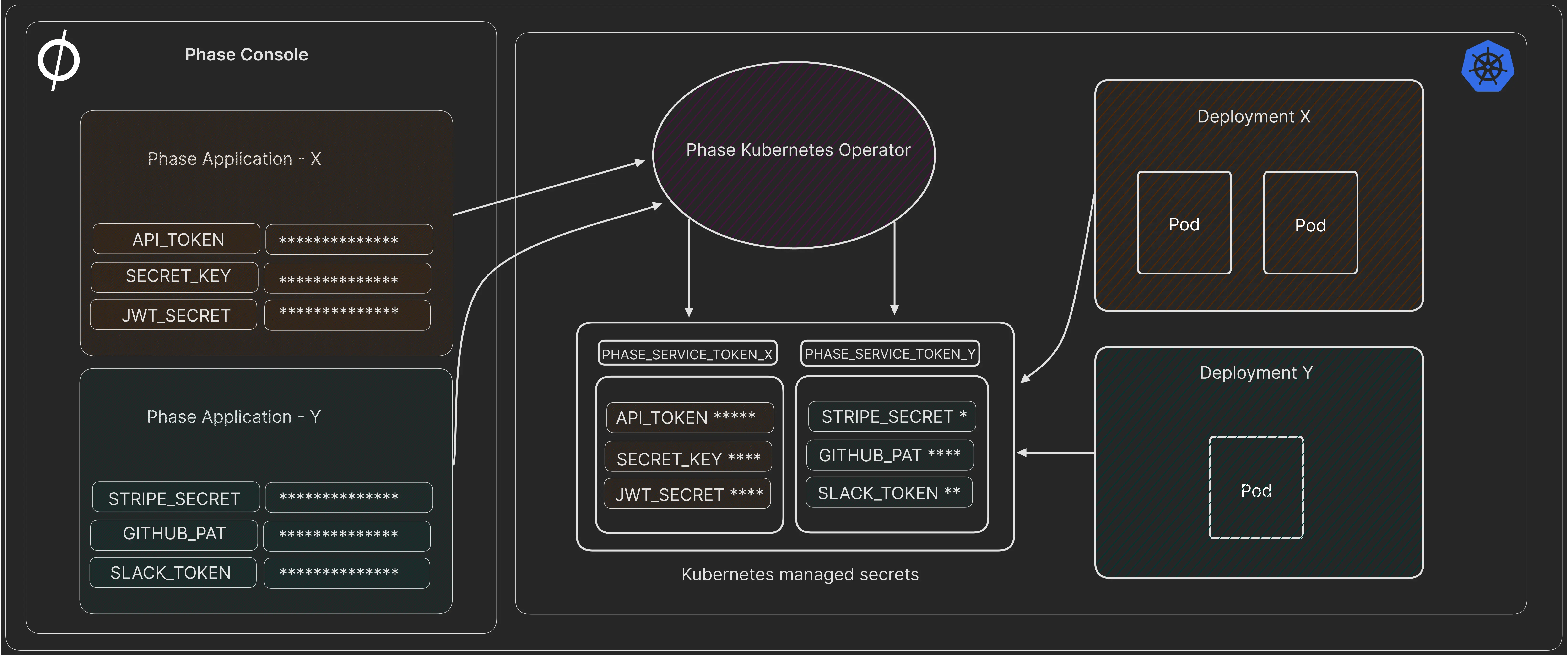
1. Install the Operator via Helm
Add the Phase Helm repository and update it:
helm repo add phase https://helm.phase.dev && helm repo update
Install the Phase Secrets Operator:
helm install phase-secrets-operator phase/phase-kubernetes-operator --set image.tag=v2.0.1
It's best practice to specify the version in production environments to avoid unintended upgrades. Find available versions on our GitHub releases.
To see the full set of configurable Helm chart options, please see: values.yaml
2. Create a Service Token Secret in Kubernetes
kubectl create secret generic phase-service-token \
  --from-literal=token=<TOKEN> \
  --type=Opaque \
  --namespace=default
3. Deploy the Phase Secrets Operator CR (Custom Resource)
Create a custom resource file: phase-secrets-operator-cr.yaml
A Basic custom resource to sync all secrets from a production environment in an App in the Phase Console to your Kubernetes cluster as my-application-secret, type Opaque.
apiVersion: secrets.phase.dev/v1alpha1
kind: PhaseSecret
metadata:
  name: example-phase-secret
  namespace: default
spec:
  phaseAppId: 'your-application-id' # The Phase application ID
  phaseAppEnv: 'production' # OPTIONAL - The Phase App Environment to fetch secrets from
  phaseAppEnvPath: '/' # OPTIONAL Path within the Phase application environment to fetch secrets from
  phaseHost: 'https://console.phase.dev' # OPTIONAL - URL of a Phase Console instance
  pollingInterval: 5 # OPTIONAL - Interval in seconds to poll for secret updates
  authentication:
    serviceToken:
      serviceTokenSecretReference:
        secretName: 'phase-service-token' # Name of the Phase Service Token with access to your application
        secretNamespace: 'default'
  managedSecretReferences:
    - secretName: 'my-application-secret' # Name of the Kubernetes managed secret that Phase will sync
      secretNamespace: 'default'
Deploy the custom resource:
kubectl apply -f phase-secrets-operator-cr.yaml
Watch for my-application-secret managed secret being created:
watch kubectl get secrets
View the secrets:
kubectl get secret my-application-secret -o yaml
The operator automatically synchronizes secrets every 60 seconds by default,
or as specified by the pollingInterval property.
Properties
- Name
phaseApp- Type
- required unless phaseAppId is set
- Description
The name of the Phase application to fetch secrets from. At least one of
phaseApporphaseAppIdis required.
- Name
phaseAppId- Type
- optional
- Description
The ID of the Phase application to fetch secrets from. This is useful when app names are ambiguous. At least one of
phaseApporphaseAppIdis required, andphaseAppIdtakes precedence overphaseAppwhen set.
- Name
phaseAppEnv- Type
- optional
- Description
The Phase App Environment to fetch secrets from (e.g., dev, staging, prod). Default:
production.
- Name
phaseAppEnvTag- Type
- optional
- Description
Tag for filtering secrets in the specified Phase App Environment. Default:
None.
- Name
phaseAppEnvPath- Type
- optional
- Description
Path within the Phase application environment to fetch secrets from. Default:
/.
- Name
phaseHost- Type
- optional
- Description
The URL of a Phase Console instance. Default:
https://console.phase.dev.
- Name
pollingInterval- Type
- optional
- Description
Interval in seconds to poll for secret updates. For near real-time syncing, it is recommended to set this value to 5 seconds or less. Default:
60.
- Name
authentication.serviceToken.serviceTokenSecretReference.secretName- Type
- required
- Description
The name of the Kubernetes managed secret containing your Phase Service Token.
- Name
authentication.serviceToken.serviceTokenSecretReference.secretNamespace- Type
- required
- Description
The namespace of the Kubernetes managed secret containing your Phase Service Token.
- Name
managedSecretReferences.secretName- Type
- Description
Name of the Kubernetes managed secret that Phase will sync secrets to.
- Name
managedSecretReferences.secretNamespace- Type
- Description
The namespace of the Kubernetes managed secret that Phase will sync secrets to.
- Name
managedSecretReferences.secretType- Type
- optional
- Description
The type of the Kubernetes Secret. Options include: "Opaque", "kubernetes.io/tls"
- Name
managedSecretReferences.nameTransformer- Type
- optional
- Description
Default name transformer applied to all secret keys in this managed secret. Per-key
nameTransformerset withinprocessorstakes precedence. Options:upper_snake,camel,upper-camel,lower-snake,tf-var,lower-kebab.
- Name
managedSecretReferences.processors- Type
- optional
- Description
Per-key processors to transform secret key names and values during ingestion. Each processor can have the following properties:
asName(rename the key),nameTransformer(transform the key casing), andtype(plainorbase64). Default for 'type':plain.
- Name
managedSecretReferences.template.metadata- Type
- optional
- Description
Labels and annotations to apply to the managed Kubernetes Secret. Use
template.metadata.labelsandtemplate.metadata.annotations.
- Name
redeployLabelSelector- Type
- optional
- Description
Kubernetes label selector used to limit which Deployments are scanned for auto-redeploy. If omitted, the operator scans all Deployments in the namespace of the managed Secret. Suitable for large deployments.
- Name
onSecretReferenceError- Type
- optional
- Description
Policy when a Phase secret reference (
${...}) cannot be resolved.Fail(default) aborts the sync so unresolved values are never written to the managed Secret.Warnsyncs anyway, leaving unresolved references as their literal${...}text. In both cases the operator records a Warning event on thePhaseSecretnaming the affected secret. Options:Fail,Warn.
Secret processors:
Secret key name transformation
The nameTransformer option transforms secret key names from UPPER_SNAKE_CASE to a target format. It can be set at two levels:
- Secret-level — applies to all keys in the managed secret.
- Per-key — set within
processorsfor a specific key. Takes precedence over the secret-level transformer.
If both asName and nameTransformer are set on the same key, asName takes precedence.
Example: Transforming all keys to camelCase
managedSecretReferences:
  - secretName: 'my-app-config'
    secretNamespace: 'default'
    nameTransformer: 'camel'
| Secret stored in Phase | Synced to Kubernetes |
|---|---|
DATABASE_HOST | databaseHost |
API_KEY | apiKey |
STRIPE_SECRET_KEY | stripeSecretKey |
Example: Mixed transformations with per-key overrides
managedSecretReferences:
  - secretName: 'my-app-config'
    secretNamespace: 'default'
    nameTransformer: 'camel'
    processors:
      DATABASE_HOST:
        nameTransformer: upper-camel
      STRIPE_SECRET_KEY:
        asName: stripeKey
| Secret stored in Phase | Processor | Synced to Kubernetes |
|---|---|---|
DATABASE_HOST | per-key upper-camel | DatabaseHost |
STRIPE_SECRET_KEY | per-key asName | stripeKey |
API_KEY | secret-level camel | apiKey |
Available transformations
| Type | Secret stored in Phase | Post transformation |
|---|---|---|
| upper_snake | SECRET_KEY | SECRET_KEY |
| camel | SECRET_KEY | secretKey |
| upper-camel | SECRET_KEY | SecretKey |
| lower-snake | SECRET_KEY | secret_key |
| tf-var | SECRET_KEY | TF_VAR_secret_key |
| lower-kebab | SECRET_KEY | secret-key |
Secret value transformation
The processors field can also transform secret values during ingestion:
asName: Renames the secret key. For instance,PKCS12_PRIVATE_KEYis renamed totls.crt.type: Specifies the encoding type of the secret.base64indicates that the secret is already base64 encoded. If a secret is set totype: "plain", which is the default, the Kubernetes operator will encode it in base64.
Example: PKCS12 Secret Transformation
Suppose we have the following secrets stored in the Phase service:
PKCS12_PRIVATE_KEY: A private key in PKCS12 format, already base64 encoded.PKCS12_CERTIFICATE: A certificate in PKCS12 format, also already base64 encoded.
In the custom resource, these are handled as follows:
apiVersion: secrets.phase.dev/v1alpha1
kind: PhaseSecret
metadata:
  name: example-phase-secret
  namespace: default
spec:
  phaseApp: 'your-application-name'
  phaseAppEnv: 'production'
  phaseAppEnvTag: 'certs'
  phaseHost: 'https://console.phase.dev'
  pollingInterval: 5
  authentication:
    serviceToken:
      serviceTokenSecretReference:
        secretName: 'phase-service-token'
        secretNamespace: 'default'
  managedSecretReferences:
    - secretName: 'pkcs12-cert'
      secretNamespace: 'default'
      secretType: 'kubernetes.io/tls'
      processors:
        PKCS12_PRIVATE_KEY:
          asName: 'tls.crt'
          type: 'base64'
        PKCS12_CERTIFICATE:
          asName: 'tls.key'
          type: 'base64'
| Secret Stored in Phase Console | Secret synced in Kubernetes Cluster |
|---|---|
PKCS12_PRIVATE_KEY | tls.crt (base64 encoded) |
PKCS12_CERTIFICATE | tls.key (base64 encoded) |
Managed Kubernetes Secret metadata
Use managedSecretReferences[].template.metadata to copy labels and annotations
onto the Kubernetes Secret managed by the operator:
managedSecretReferences:
  - secretName: 'my-application-secret'
    secretNamespace: 'default'
    template:
      metadata:
        labels:
          app.kubernetes.io/managed-by: phase
        annotations:
          example.com/owner: platform
For existing managed Secrets, metadata is merged. The operator preserves labels
and annotations that already exist on the Secret, and sets or updates only the
keys specified in template.metadata. Removing a key from template.metadata
does not remove that key from an existing Kubernetes Secret.
For kubernetes.io/service-account-token Secrets, Kubernetes requires the
service account name annotation. Set it through the Secret metadata template:
managedSecretReferences:
  - secretName: 'my-service-account-token'
    secretNamespace: 'default'
    secretType: 'kubernetes.io/service-account-token'
    template:
      metadata:
        annotations:
          kubernetes.io/service-account.name: my-service-account
Using secrets in Kubernetes Deployments
1. Using Environment Variables
Expose specific secret(s) from your Kubernetes secret to your deployment as environment variables:
apiVersion: apps/v1
kind: Deployment
metadata:
  name: my-app-deployment
spec:
  replicas: 1
  selector:
    matchLabels:
      app: my-app
  template:
    metadata:
      labels:
        app: my-app
    spec:
      containers:
        - name: my-app
          image: my-app-image
          env:
            - name: MY_SECRET_KEY
              valueFrom:
                secretKeyRef:
                  name: my-application-secret
                  key: MY_SECRET_KEY
2. Using envFrom to inject all secrets
Expose all secrets in your Kubernetes secrets to your deployment as environment variables:
apiVersion: apps/v1
kind: Deployment
metadata:
  name: my-app-deployment
spec:
  replicas: 1
  selector:
    matchLabels:
      app: my-app
  template:
    metadata:
      labels:
        app: my-app
    spec:
      containers:
        - name: my-app
          image: my-app-image
          envFrom:
            - secretRef:
                name: my-application-secret
3. Mounting secrets as an in-memory volume
Mount secrets as an in-memory volume for scenarios requiring configuration files:
apiVersion: apps/v1
kind: Deployment
metadata:
  name: my-app-deployment
spec:
  replicas: 1
  selector:
    matchLabels:
      app: my-app
  template:
    metadata:
      labels:
        app: my-app
    spec:
      containers:
        - name: my-app
          image: my-app-image
          volumeMounts:
            - name: secret-volume
              mountPath: /etc/secrets
              readOnly: true
      volumes:
        - name: secret-volume
          secret:
            secretName: my-application-secret
4. Auto-Redeploying Deployments When Secrets Change
To ensure that deployments are automatically redeployed when their associated secrets change, add the secrets.phase.dev/redeploy annotation with a value of "true" to your deployment. This instructs the Phase Kubernetes Operator to redeploy the application whenever the specified secrets are updated.
The redeployment annotation will only trigger when secrets have been provisioned to a deployment using secretRef.
You can set spec.redeployLabelSelector on the PhaseSecret to narrow which
Deployments are scanned for auto-redeploy:
spec:
  redeployLabelSelector: 'app.kubernetes.io/part-of=my-app'
Here's an example deployment manifest incorporating this approach:
apiVersion: apps/v1
kind: Deployment
metadata:
  name: my-app-autoredeploy
  annotations:
    secrets.phase.dev/redeploy: 'true'
spec:
  replicas: 1
  selector:
    matchLabels:
      app: my-app-autoredeploy
  template:
    metadata:
      labels:
        app: my-app-autoredeploy
    spec:
      containers:
        - name: my-app
          image: my-app-image
          envFrom:
            - secretRef:
                name: my-application-secret
When Operator Triggers Redeployment
The operator triggers redeployment in the following case:
-
Secret Change Detected: When the operator updates a Kubernetes secret, it checks for deployments in the same namespace that have the
secrets.phase.dev/redeployannotation set. -
Annotation Present on Deployment: If a deployment has the annotation
secrets.phase.dev/redeploy, it indicates that this deployment is reliant on the secret(s) being managed by the operator. -
Secret Reference Match: The deployment must reference the managed Secret through
envFrom.secretRef. -
Patching the Deployment for Redeployment: When such a deployment is found, the operator triggers a redeployment by updating an annotation on the deployment's pod template, which results in Kubernetes redeploying the pods.
When Operator Does Not Trigger Redeployment
The operator does not trigger redeployment in the following cases:
-
No Secret Change: If there are no changes in the secrets (i.e., the fetched secrets from Phase service are the same as what's already in Kubernetes), the operator does not perform any secret update actions, and consequently, no redeployment is triggered.
-
Deployment Lacks Annotation: If a deployment in the namespace does not have the
secrets.phase.dev/redeployannotation, it will not be considered for redeployment by the operator, even if it uses the secrets being managed. -
Selector Does Not Match: If
redeployLabelSelectoris configured and a deployment does not match it, that deployment will not be scanned for redeployment. -
Secret Change Not Affecting Deployments: If the updated secret is not used by any deployment or if the deployments using the secret do not rely on the operator for updates (i.e., they do not have the redeploy annotation), those deployments will not be redeployed.
-
Errors During Processing: If there's an error in processing the secrets (e.g., fetching from Phase service, processing, or updating in Kubernetes), and as a result, the secret update doesn’t happen, then no redeployment will be triggered.
Operator Runtime Behavior
The Phase Secrets Operator makes a few deliberate tradeoffs:
- Managed Secrets are updated in place. If Kubernetes rejects an update, the existing Secret is left untouched and the operator retries later; Secret availability is preferred over forced delete/recreate.
- Changing immutable Secret fields such as
typemay require manually deleting and recreating the Secret. template.metadatalabels/annotations are merged into existing Secret metadata. Removing a key from the CR does not remove it from an existing Secret.type: base64expects a base64 value in Phase and preserves the workload-facing Kubernetes Secret payload.- Unresolved
${...}references abort the sync by default (onSecretReferenceError: Fail), so a broken value is never written to the managed Secret; setonSecretReferenceError: Warnto sync the remaining keys with unresolved references left as literal${...}text. In both modes a Warning event is recorded on thePhaseSecretnaming the affected secret. - Auto-redeploy requires
secrets.phase.dev/redeploy, anenvFrom.secretRefmatch, and a changed managed Secret. - Service token and managed Secret namespaces are explicit; auto-redeploy scans
Deployments in the
PhaseSecretnamespace.
Transient Phase API failures are retried before the reconcile is requeued. Rate
limits (429) and server errors (5xx) use the same retry and backoff settings.
The operator does not crash on these API errors.
The following Helm values control retry, backoff, and reconcile concurrency:
operator:
  env:
    PHASE_OPERATOR_HTTP_RETRIES: '5'
    PHASE_OPERATOR_HTTP_BACKOFF: '1'
    PHASE_OPERATOR_MAX_CONCURRENT_RECONCILES: '4'
Security Considerations
- Least Privilege: Ensure applications have access only to the secrets they need.
- RBAC Policies: Implement Role-Based Access Control policies to restrict access to secrets.
Troubleshooting and Debugging the Phase Kubernetes Operator
Check Operator Logs
View logs for potential errors or misconfigurations:
kubectl get pods
kubectl logs <operator-pod-name>
Example (revoked Service Token):
λ kubectl logs phase-secrets-operator-phase-kubernetes-operator-8b69db6f-f4m8s -f
ERROR failed to fetch Phase environment metadata
ERROR failed to fetch Phase secrets
Check Sync Status
The Phase Kubernetes Operator only initiates a full secret sync when a change is made in your source environment in Phase or the PhaseSecret spec changes. The operator will periodically check for changes and store the last synced Phase timestamp and spec hash in the following format {namespace}:{cr_name}:{cr_uid} at /tmp/phase_sync_status.json location. This file is stored in the operator pod filesystem and may be reset when the pod is recreated. You may choose to delete this file to manually force a full sync.
View the sync status to see if the operator is trying to sync secrets that are not present in the Phase Console:
cat /tmp/phase_sync_status.json
Example output:
{
  "default:example-phase-secret:a6244420-a712-4ac2-b9c2-eae80ea5cdba": {
    "updated_at": "2025-08-13T09:39:21.940863Z",
    "spec_hash": "7d4c5b7f0a5d7a9b"
  }
}
Verify Operator Status
Ensure the operator is running correctly:
kubectl get deployment <operator-deployment-name> -n <operator-namespace>
Inspect the Custom Resource (CR)
Check for correct configuration:
kubectl get phasesecret example-phase-secret -n default -o yaml
Check Events
View Kubernetes events for a timeline of cluster activities:
kubectl describe phasesecret example-phase-secret -n default
Review Kubernetes Secrets
Verify the presence and content of synced secrets:
kubectl get secret my-application-secret -n default -o yaml
Examine RBAC Settings
Ensure appropriate permissions are set:
kubectl get clusterrole <operator-cluster-role>
kubectl get clusterrolebinding <operator-cluster-rolebinding>
Operator Version and Updates
Compare the deployed version with the latest available version:
helm list -n <operator-namespace>
Resource Limits and Quotas
Check for any resource constraints:
kubectl describe deployment <operator-deployment-name> -n <operator-namespace>
Uninstall the Operator
Remove the operator using Helm:
helm uninstall phase-secrets-operator
Deleting a PhaseSecret, or uninstalling the operator, does not delete the Kubernetes
Secrets it created. Remove any managed Secrets you no longer need manually.
Using Init Container
You can easily integrate with your kubernetes workload and inject secrets securely using in memory init containers.
- Create
PHASE_SERVICE_TOKENKubernetes secret.
kubectl create secret generic phase-service-token --from-literal=PHASE_SERVICE_TOKEN=<TOKEN> --namespace=default
- Here's an example
deploy.yaml:
apiVersion: apps/v1
kind: Deployment
metadata:
  name: my-deployment
spec:
  replicas: 1
  selector:
    matchLabels:
      app: my-app
  template:
    metadata:
      labels:
        app: my-app
    spec:
      volumes:
        - name: secrets-volume
          emptyDir:
            medium: Memory
      initContainers:
        - name: fetch-secrets
          image: phasehq/cli:latest
          volumeMounts:
            - name: secrets-volume
              mountPath: /secrets
          env:
            - name: PHASE_SERVICE_TOKEN
              valueFrom:
                secretKeyRef:
                  name: phase-service-token
                  key: PHASE_SERVICE_TOKEN
          command:
            [
              '/bin/sh',
              '-c',
              'phase secrets export --app "my application name" --env development > /secrets/secrets.env',
            ]
      containers:
        - name: main-container
          image: alpine:latest
          volumeMounts:
            - name: secrets-volume
              mountPath: /secrets
          command: ['/bin/sh', '-c', 'cat /secrets/secrets.env && sleep 3600']
Security Benefits
-
Isolation of Responsibilities: Init containers allow you to separate the responsibility of setting up the environment from the primary purpose of the main container. By using init containers solely to fetch secrets and populate in-memory volumes, you reduce the surface area for potential attacks targeted at the main application.
-
Transient Nature: By using in-memory volumes, the data doesn't persist beyond the lifecycle of the pod. When the pod is terminated, the data is lost. This reduces the risk of secret data being left behind.
-
No Persistent Storage: Since secrets fetched and placed in an in-memory volume aren't written to any persistent storage, there's no risk of them being exposed if the underlying storage is compromised or improperly decommissioned.
Security Considerations
-
In-Memory Exposure: While the secrets are not persisted to disk, they are still available in the node's RAM. A process or user with sufficient privileges on the node could potentially access data directly from memory.
-
Swap Space: If the Kubernetes node is configured with swap, and the node starts swapping memory contents to disk, in-memory data (including secrets) might end up being written to swap space. It's recommended to disable swap on Kubernetes nodes for this (and other) reasons.
-
Secret Versioning: If you update a secret, the change won't be automatically propagated to running pods. The pods need to be restarted to pick up the new version of the secret.